A demo that can only show a working feature
A finished feature used to wait for a demo meeting before QA saw it. The code was done. The meeting was the queue.
/demo is my attempt to replace that meeting with a video on the ticket. It’s the
newest skill in rmine-skills, my Claude Code plugin for Redmine. I give it a ticket
number. It reads the acceptance criteria and writes one scene per criterion, each with
a caption and a check that proves it. Then it drives the app running on my machine
through those scenes with Playwright, rehearses until every check passes, records one
take, and cuts the page loads out with ffmpeg. The video goes on the ticket as a single
comment with a chapter list (or one screenshot per scene, for a small feature), so PM
and QA can watch it when they have a minute and reply against a time: “at 1:30 the
empty state is wrong”.
Nothing goes on the ticket until I’ve watched the video and said yes to the exact comment it will post.
Every scene ends on a check
A scene in the script looks like this:
{
  "caption": "Filter the list by status",
  "start": "/items",
  "steps": [
    { "click": { "role": "button", "name": "Filters" } },
    { "select": { "label": "Status" }, "value": "Open" }
  ],
  "expect": [{ "visible": { "text": "3 results" } }, { "url": "status=open" }]
}
The expect list is the point of the whole thing. The reference the agent writes
scenes from puts it plainly: “the saved row shows Open” is a check, “the Save button
exists” is not.
If a check fails while recording, the run stops and there is no take to assemble. Every run also deletes the previous take before it starts, so an old one can’t be assembled and posted by mistake. Put together, a video that reaches the ticket shows each criterion passing.
There’s a catch with letting an agent write both the steps and the checks. The quickest way to a green run is to loosen the check. So the skill sorts failures into two kinds. A wrong locator or a timing problem is a script fix, and the agent fixes it and rehearses again. A feature that misbehaves is a finding: the agent stops and tells me which scene failed and what was on screen, from a screenshot and the page’s accessibility tree saved at the moment it failed. The instruction for the second case is one line, “Checks stay as strict as the criterion.”
The caption goes under the video
The first version drew captions inside the page, on top of the app, which is where the thing being described usually is. The second put them in a dark band under the video. Neither stayed.
What stuck is a frame. The take plays as a rounded window on a light canvas, and underneath it sit the step number, a progress bar that fills as the scene plays, the caption, the ticket’s subject and the time. Nothing is drawn over the app except the pointer, and that’s a plain white arrow with a neutral ripple on each click. I tried highlighting the target of every action too. It went the same way as the dark band.
This is a frame from a take it recorded on Playwright’s public TodoMVC demo, halfway through the second scene:
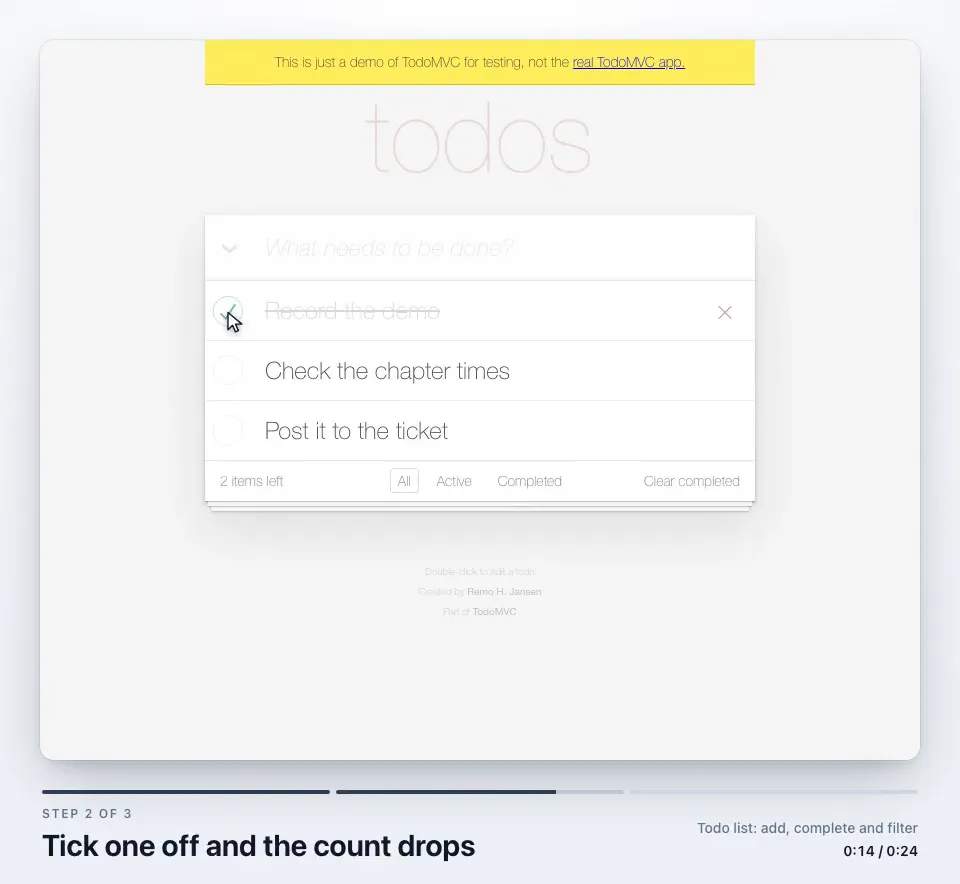
Assembly also writes a contact sheet: the last frame of every scene, side by side. The review step reads it before the video. If a scene’s final frame doesn’t make its criterion obvious, the scene needs a better ending, and that’s much quicker to see in one image than by scrubbing a video.
One take, loading cut out
Each scene could start on a fresh page load. That’s easier to script and worse to watch, because every reload is time the viewer sits through. So scenes after the first carry on from where the last one ended, and the agent orders them so each one builds on the one before.
Some scenes still need a new page. The runner notes the wall-clock time when each
scene’s page is ready and again when the scene ends, and assembly keeps only those
stretches, joined with ffmpeg’s trim and concat filters.
Which raised the next problem. Wall-clock times are no use for chapters. The chapter list needs to say where each scene starts in the video file.
A black frame for time zero
My first approach counted back from the end. The take finishes at a moment I know, so subtract. On a real app it came out up to a second late, which is enough for “1:30” to land in the previous scene.
Now the runner opens every take on a black page, switches it to white after half a second, and notes the time of the switch. Assembly reads the first ten seconds of the recording with ffmpeg, takes the brightness of an 8x8 patch in the middle of each frame, and finds the first white frame after a black one. That frame and the noted time are the same instant, so every other mark converts directly:
const times = marks.map((m) => Math.round((syncVideoSec + (m - syncWallMs) / 1000) * 100) / 100);The same times go into the MP4 as chapter markers, so players that show chapters show the scenes.
It never failed on my Mac
On CI’s Linux runners, recordings sometimes failed with No sync frame found in the recording. Two of nine recording tests on the pull request’s run, one on the run
after merge. All of them on Node 18, but two runs are too few to call that a pattern.
On my Mac, fifteen takes of the warm-up, with the CPU idle and with it saturated, all caught ten to twelve black frames and then white. So the black was being recorded here and something on Linux was losing either the black or the white. The error message couldn’t say which.
The tempting fix was a longer warm-up. I wrote in the issue that lengthening it without evidence would only hide the cause, and recorded the warm-up in the Playwright Linux image instead, printing how many black and white frames each take caught. Three of five takes opened on white. The black was never recorded at all.
Playwright writes a video frame only when the browser sends one after a paint. The black page was static, so the browser painted it once. On Linux that one paint often happened before frames started flowing, so the video began on white and there was no switch to find.
The fix is to keep the page painting. A one-pixel element in the corner alternates between two shades of black on every animation frame, and the middle, where the check reads, stays black:
let n = 0; (function repaint() { tick.style.background = n++ % 2 ? "#010101" : "#020202";
requestAnimationFrame(repaint); })();
In that image, between one and seven of the 23 recording tests had been failing on every run. After the change, five runs passed 23 of 23.
Smaller things that took longer than they should have
Waiting for a page. Playwright’s load event waits for every asset, and on a real
app it hung on third-party scripts. A page now counts as settled at
domcontentloaded plus network idle, and the network idle wait gives up after ten
seconds:
await page.waitForLoadState('networkidle', { timeout: SETTLE_MS }).catch(() => {});Moving the pointer. Moves used to be a fixed number of small steps. On a slow canvas each step waited on the page, and a two-second drag took eighteen. Moves are now timed by the clock: each one works out where the pointer should be from the time elapsed, so a slow page skips positions instead of stretching the move.
Scene order. Watchers give the video a minute between other work, so the scene that matters most goes first. The order comes from the ticket itself: the priority the spec states, then what the customer asked for before what was added internally, then the spec’s own order, with risk breaking ties. Each scene’s reason is written in the scene list, so I can overrule it before anything is filmed.
Size. Redmine caps attachment size, and the cap varies by install, so /demo asks
for it once and assumes 5 MB if you don’t know. The video is encoded at a fixed quality
first and only squeezed if it’s over. If it would have to drop below 150 kbps to fit,
it stops and offers screenshots or two shorter videos instead.
A full dry run on a real ticket came out at five scenes, 47 seconds and 0.6 MB.
What it doesn’t do yet
Three things are on the roadmap, each as its own step:
- Longer videos through Google Drive. The attachment cap limits how long a demo can be. The plan is to copy the video into Drive’s synced folder, share it with a group, and post the link instead. The Drive connector can’t carry the upload, because it takes the file as base64 text inside one message, which is too big even for a short video.
- A voice-over cut. Plain footage is enough for PM and QA. A narrated version is for people who weren’t in the conversation.
- Recording against staging. Right now it only records locally, because I sign in with my own local account in a browser window the skill opens, and the session is saved outside the repo where only I can read it. Staging needs a shared way to sign in that still keeps passwords out of the skill.
Title cards, zooms and music are left out on purpose.
The plugin is open source and MIT licensed: github.com/mehboobali98/rmine-skills.